IT managers want to see the environment you supported: how many users and devices, which platforms, how many tickets a week, and whether your certifications are still current.
The four examples cover an IT specialist at a logistics firm, a new help desk graduate, an on-call systems administrator and a desktop technician at a community hospital.
IT specialist resume with users, endpoints and ticket volume up front
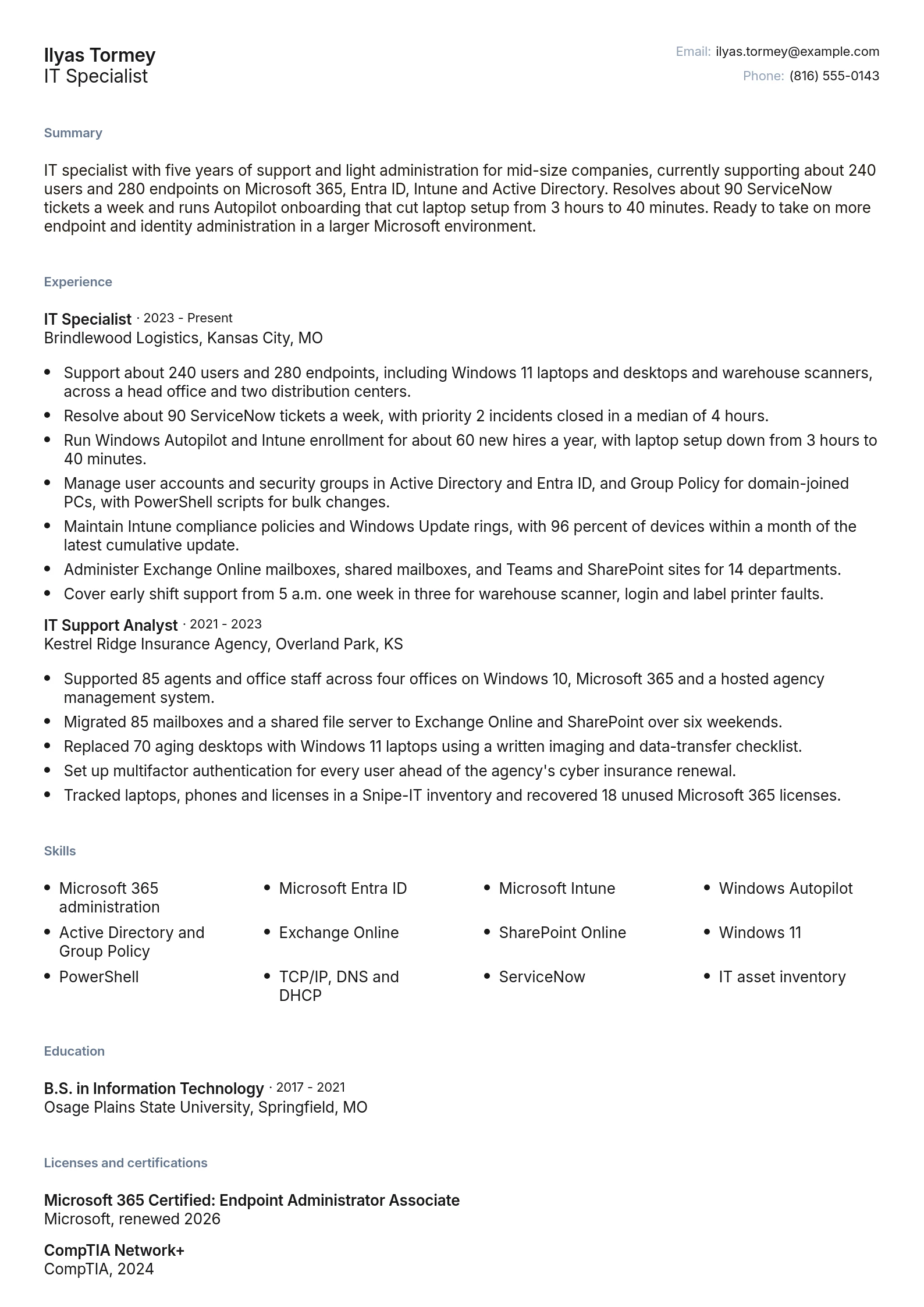
Ilyas supports about 240 users and 280 endpoints, and his summary says so in its first line, before any tool. A hiring manager can tell at a glance whether his environment is the size of theirs.
His bullets name the Microsoft stack that support ads list (Entra ID, Intune, Exchange Online and Active Directory) and pair each with a number: 90 ServiceNow tickets a week, about 60 hires a year through Autopilot, and laptop setup cut from 3 hours to 40 minutes. Both certifications show a current year, and the Endpoint Administrator line shows a 2026 renewal because Microsoft role-based certifications lapse after 12 months.
Copy this structure if you handle support and some administration at a company of a few hundred people. Swap in your own counts and platforms, and keep the earlier, smaller job to four or five bullets.
Help desk, systems administrator and hospital support resumes
Each example shows a different environment, schedule and certification path. Pick the one whose setting matches the ads you're applying to, then replace its numbers with yours.
Entry level IT resume with an internship and home lab
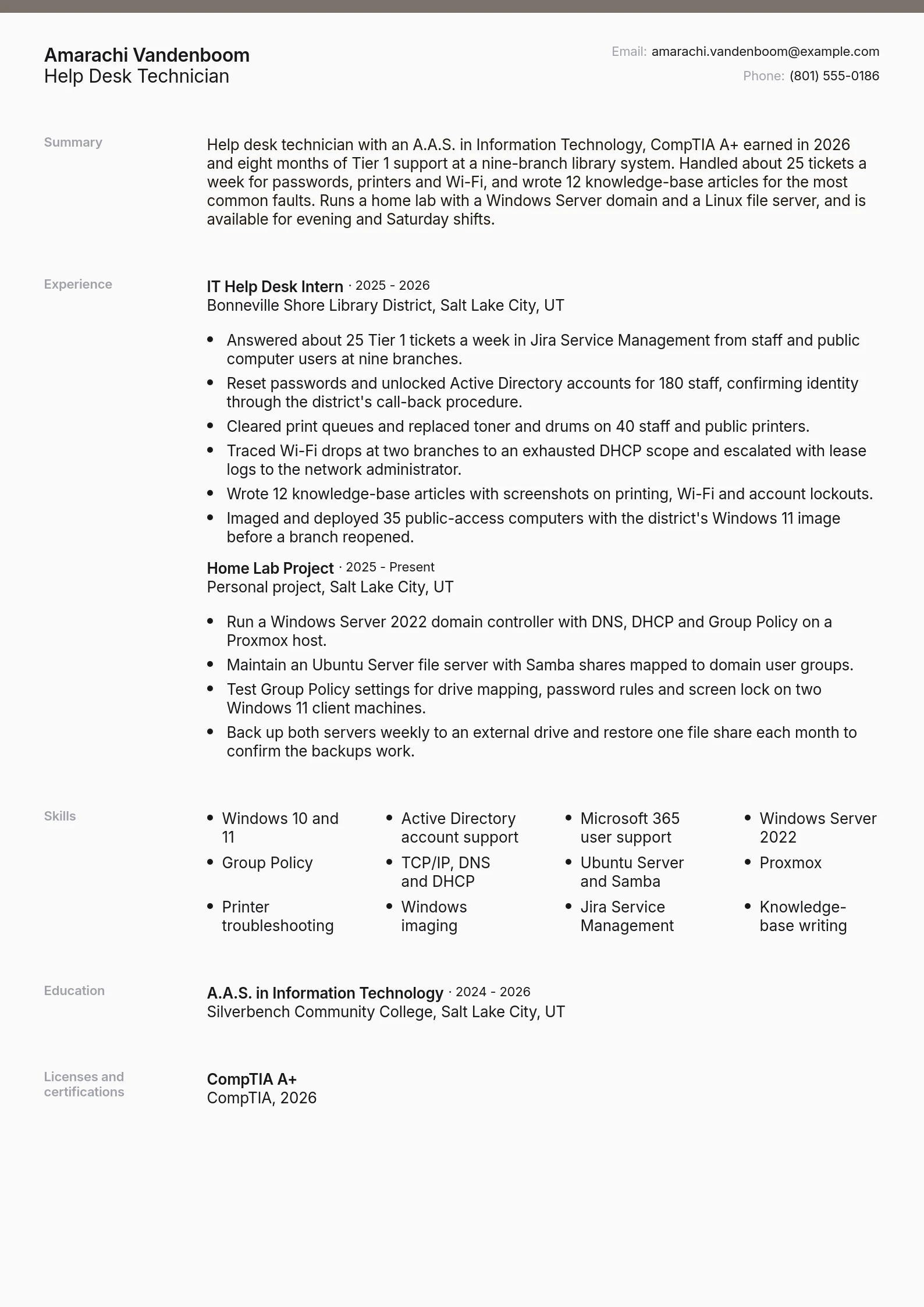
Amarachi has one IT internship, so her resume makes it count with ticket types, a weekly volume of 25 and 12 knowledge-base articles. A separate home lab entry shows the Windows Server domain, DNS, DHCP and Group Policy she configured herself, and her summary states evening and Saturday availability. Use it if you're finishing an associate degree or certificate program and hold CompTIA A+ or are close to passing it.
Internship bullets give ticket volume, ticket types and branch count
Home lab listed as its own entry with weekly backups and a monthly restore test
CompTIA A+ shown with the year earned
Systems administrator resume with an on-call rotation
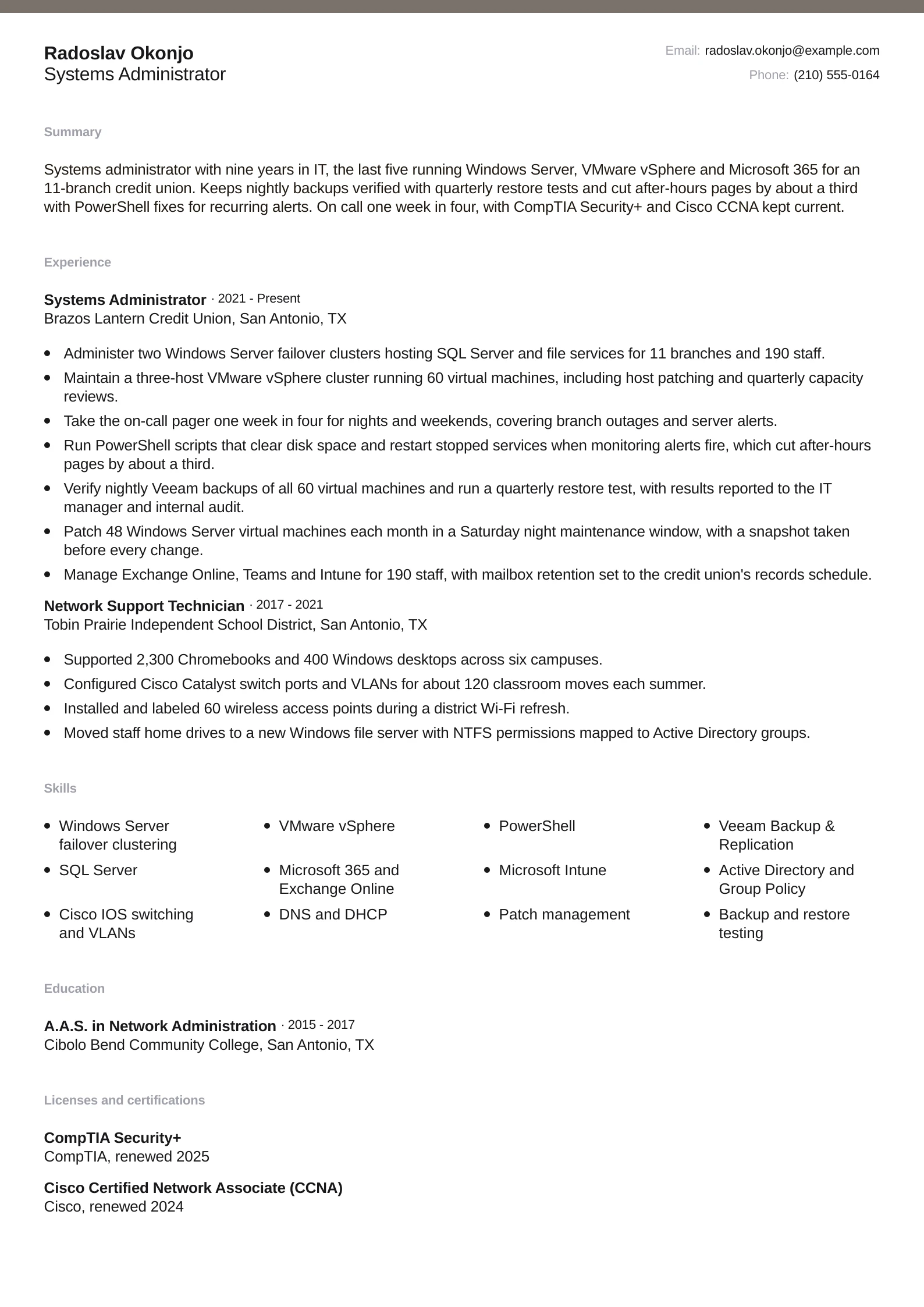
Radoslav's resume leads with the stack a credit union ad asks for: Windows Server failover clusters, a three-host vSphere cluster running 60 virtual machines, Exchange Online and PowerShell. The on-call rotation gets its own bullet, and his scripting is tied to a result, about a third fewer after-hours pages. Use it if you administer servers for a regulated employer and need to show backup testing, maintenance windows and certifications kept current.
On call one week in four, stated in the summary and a bullet
Quarterly restore tests and Saturday patch windows named
Security+ and CCNA listed with renewal years
Healthcare IT support resume with weekend coverage
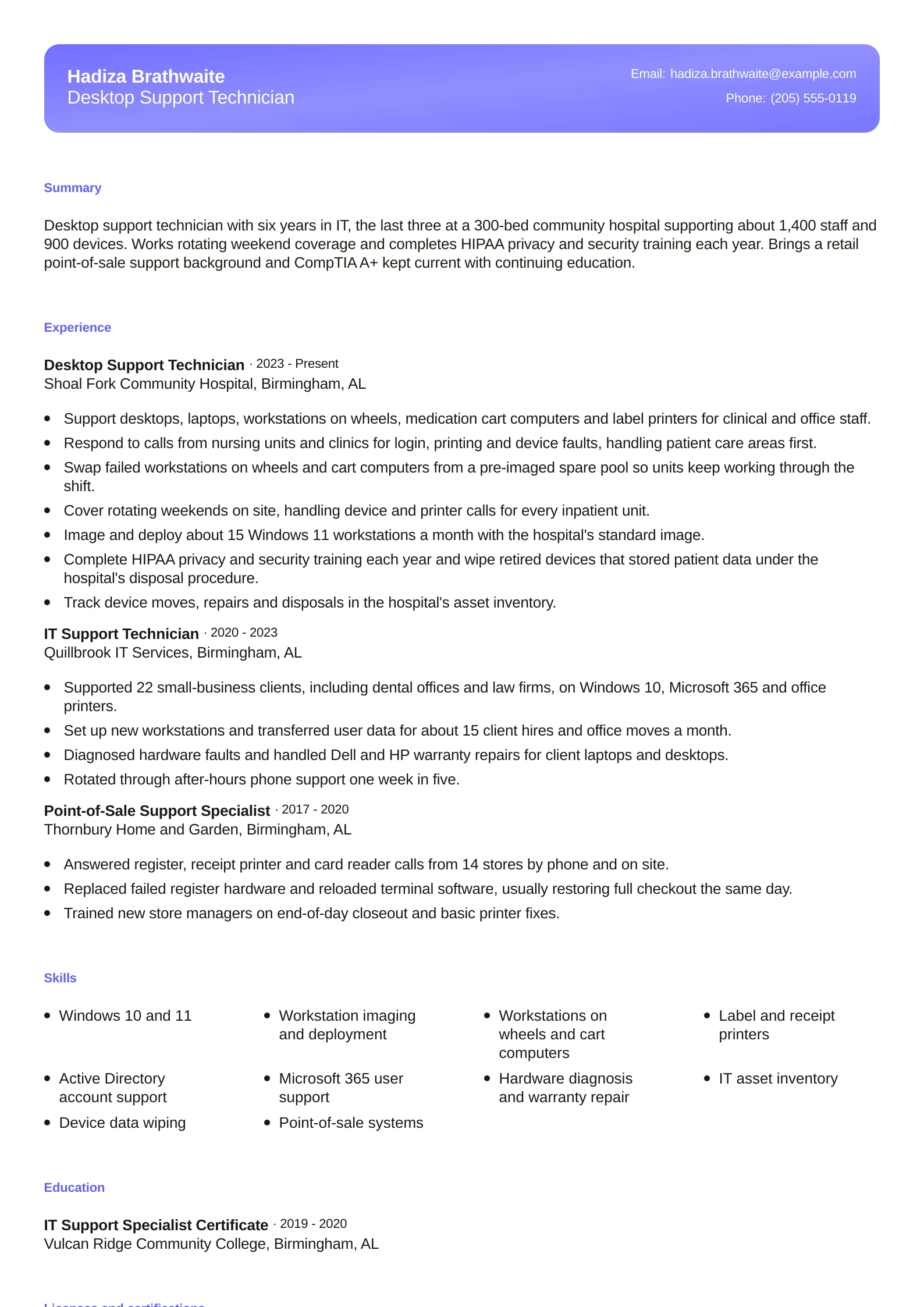
Hadiza supports 1,400 hospital staff and 900 devices, and her bullets name the clinical equipment desktop support covers: workstations on wheels, medication cart computers and label printers. Rotating weekend coverage is its own bullet, HIPAA appears as annual employer training, and A+ shows a 2026 renewal. Use it if you support a hospital or clinic, or if you're moving into desktop support from point-of-sale or retail tech work.
Clinical devices named alongside desktops and laptops
HIPAA privacy and security training written as annual training
Retail point-of-sale support kept as relevant earlier experience
Name each platform with the number of users or devices it covered
Name the platforms the ad names, and tie each one to the size of what you ran. A list of tools can't tell a manager whether you supported 150 users or 4,000, and that number decides whether your experience fits their environment.
Put your user and endpoint count in the summary and the first bullet of your current job, such as 'about 240 users and 280 endpoints on Microsoft 365.' Help desk candidates add ticket volume and the system it ran in, such as 25 tickets a week in Jira Service Management or 90 a week in ServiceNow.
Cover the platform groups that IT ads list. Identity means Active Directory, Entra ID and Group Policy. Endpoint management means Intune, Autopilot or Configuration Manager. Networking means TCP/IP, DNS, DHCP, VLANs and Wi-Fi. Systems administrators add Windows Server, VMware vSphere, backup software and PowerShell. Give each group a bullet that shows work done with it, then repeat the key names in your skills list.
Add version numbers only when the ad uses them. 'Windows 11' helps for a desktop role whose ad names it, but most server ads just say 'Windows Server' and a version adds nothing.
Platforms tied to users, volume and a result
Support about 240 users and 280 endpoints on Microsoft 365, Entra ID and Intune, and resolve about 90 ServiceNow tickets a week. Autopilot onboarding cut new-laptop setup from 3 hours to 40 minutes.
Tools with no scope
Used Active Directory, Intune, ServiceNow and Microsoft 365 to support users and resolve issues.
Show the year each certification was earned or last renewed
IT managers check whether a certification is current, so write the issuer and the year earned or renewed under each one. CompTIA A+, Network+ and Security+ expire three years after the certification date, CCNA lasts three years, and Microsoft role-based certifications expire after 12 months unless renewed.
Write 'CompTIA, renewed 2025' or 'Microsoft, renewed 2026' below the certification name. Leave out exam version numbers, because ads ask for the certification by name. Drop any certification that has expired.
Some defense IT support jobs require an information assurance certification within six months of hire, as one Air National Guard IT specialist ad did. If you're working toward one, write the exam and the month it's booked for, such as 'CompTIA Security+, exam scheduled March 2027.'
Certification
Best for
Stays current for
Write it as
CompTIA A+
Help desk and desktop support. Requires passing two exams, Core 1 and Core 2
Three years, renewable with continuing education or the current exams
CompTIA A+, with 'CompTIA, 2026' below
CompTIA Network+
Support roles that include LAN, Wi-Fi, DNS and DHCP work
Three years, renewable with continuing education or the current exam
CompTIA Network+, with 'CompTIA, 2024' below
CompTIA Security+
Systems administrators and jobs that require a security certification
Three years, renewable with continuing education or the current exam
CompTIA Security+, with 'CompTIA, renewed 2025' below
Cisco CCNA
Roles that configure switches, routers and VLANs. No prerequisites
Three years, renewable with a current exam or 30 continuing education credits
Cisco Certified Network Associate (CCNA), with 'Cisco, renewed 2024' below
Microsoft 365 Certified: Endpoint Administrator Associate
IT specialists who manage devices with Intune, Autopilot and Entra ID
12 months, renewed free through an online assessment
The full certification name, with 'Microsoft, renewed 2026' below
Build an entry level IT resume from tickets, a home lab and A+
With little full-time IT experience, build the resume from the IT work you have done anywhere: an internship, a campus help desk, a home lab, or tech support you handled in a non-IT job. Give each its own entry with dates, so a manager reads it as experience instead of a line in your skills list.
For an internship or student job, write the ticket volume and the ticket types: 'Answered about 25 Tier 1 tickets a week for password resets, printer faults and Wi-Fi drops.' Add a bullet for anything you documented, such as knowledge-base articles with screenshots, because writing fixes down is part of every help desk job.
For a home lab, name what you configured and what it runs on: a Windows Server domain controller with DNS, DHCP and Group Policy, an Ubuntu file server, and the hypervisor underneath. Add a maintenance habit such as weekly backups and a monthly restore test. List it as 'Home Lab Project' with 'Personal project' and your city in place of an employer.
Put CompTIA A+ in your summary and credentials if you hold it, because some support ads list it as an advantage. It takes two exams, Core 1 and Core 2, so if you've passed only Core 1, list your IT coursework and add A+ once you pass Core 2.
If you've worked retail, food service or a call center, keep one short entry and pick the bullets closest to IT support: register or scanner faults you fixed, customers you walked through a problem, shifts you covered. Keep it to two or three bullets so your IT entries stay at the top.
Pick a layout that keeps skills and certifications easy to scan
A good information technology resume template keeps your summary and experience in the main column and gives skills and certifications a clear block of their own, because managers scan those for platform names and current dates. One page fits most help desk and IT specialist resumes. A systems administrator with eight or more years and several environments can run to two pages.
Keep the skills list to the 10 to 14 platforms you'd be comfortable discussing in an interview, and place related ones together: identity, endpoints, networking, servers, then ticketing. Write each name the way the ad writes it, such as 'Microsoft Entra ID' and 'Exchange Online', so a recruiter searching for the term finds it.
A layout with a sidebar suits a one-page resume with a short skills list, like the IT specialist and entry level examples. A split layout with tighter spacing, like the systems administrator example, fits more servers, scripts and certifications without crowding the experience section.
Leave out skill-level bars, ratings and an icon for each tool. A bar that rates PowerShell at 70 percent tells a manager nothing, while a bullet about the script and the problem it fixed does.
Write your on-call rotation and coverage hours as plain numbers
State the rotation in a bullet, with how often you're on call and what you handle: 'Take the on-call pager one week in four for nights and weekends, covering branch outages and server alerts.' Systems administrator and public-sector ads often list on-call duty, weekend coverage and early or late hours, so this line answers a screening question directly.
For shift-based support, name the pattern, such as rotating weekends, one weekend in three, or a Tuesday to Saturday schedule. Computer support can be needed 24 hours a day, so if you've covered weekends or nights on site, say so and note whether you handled calls on your own.
Pair on-call duty with a result when you have one. Fewer after-hours pages, faster restores or alerts fixed by script show that you improved the rotation as well as covering it. Radoslav's resume ties PowerShell fixes for low disk space and stopped services to about a third fewer pages.
If you're applying for your first help desk job, put the hours you can work in your summary, such as 'available for evening and Saturday shifts.' Make sure the hours you list don't clash with a job or class schedule shown elsewhere on the resume.